Effortless Customisation
Fine-Tune Your Search Without Writing a Line of Code
Most search plugins hand you a wall of weights, engines and attributes. RocoSearch gives you plain sentences, simple sliders and a live preview.
You Shouldn't Need a Developer to Improve Your Own Search
Search plugins are usually built by developers, for developers. The settings ask for numeric weights, index attributes and engine configuration, so most site owners install one and never dare touch it.
RocoSearch works well with no changes at all. And when you do want to adjust something, every option reads like a sentence you could say out loud.
Settings Anyone Can Understand
Sentences and Sliders
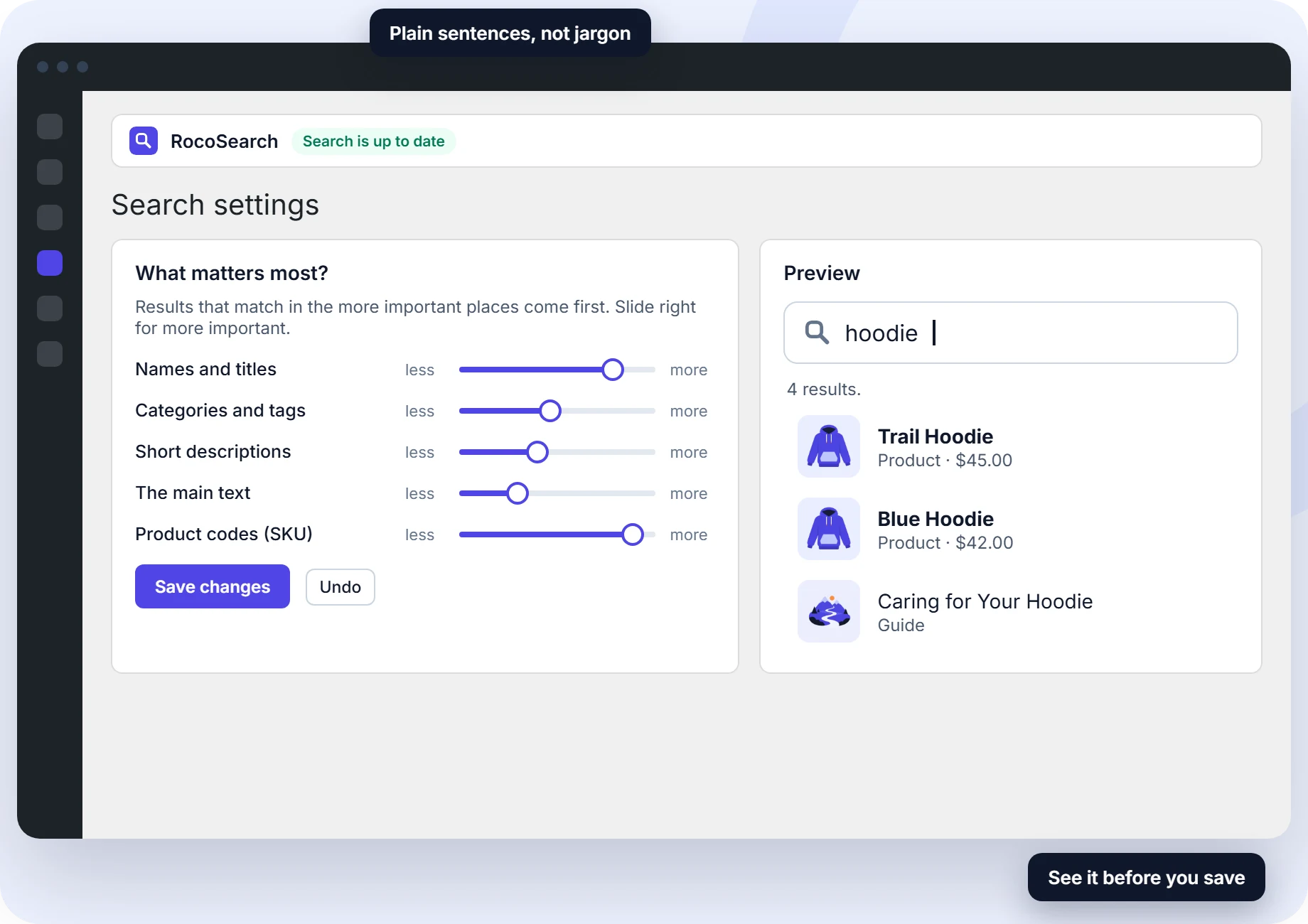
“Search these things: Posts, Pages, Products.” “Names and titles matter more.” Sliders run from less to more. There isn't a number in sight.
A Live Preview Beside Every Slider
Type a search into the preview and move a slider. The results reorder straight away, before anything is saved, so you can see exactly what a change does.
Impossible to Get Wrong
Undo your changes with one button, or go back to the recommended settings at any time. Your visitors only see a change once you press Save.
Decide What Can Be Found
Choose which kinds of content are searched, how much of each post's text is included, and whether extra fields added by other plugins count. Hide any individual page, post or product from search in a couple of clicks.
Decide What Matters Most
Nine simple sliders cover everything a search can match:
- Names and titles
- Product codes (SKU) and barcodes
- Brands, and product details like colour and size
- Categories and tags
- Short descriptions, full text and extra fields
- Author names
Helpful Choices for Shops
Decide what happens to sold-out products: show them lower down, treat them the same as everything else, or hide them from search altogether.
What It Doesn't Do
RocoSearch gives your site one well-tuned search. It doesn't let you build several separate search engines with different rules for different parts of your site. If you need that, a developer-focused plugin is a better fit.
Frequently Asked Questions
Do I have to change any settings?
No. The recommended settings suit most sites, and RocoSearch works the moment it's installed.
Will changing a setting slow my site down?
No. Slider changes take effect instantly. Changing what's searched means RocoSearch re-reads your content in the background, while your search keeps working.
Can I undo a change?
Yes. “Undo changes” discards anything you haven't saved, and “Reset to recommended” restores the defaults.
Take Control of Your Search in Minutes
Install RocoSearch free and shape your search with settings you can actually read.
Free forever. No credit card. Nothing locked.